Alerts and notifications

Alert rules defined by indicator, measurement point and limit, and the notification log they produce when measurements move out of range.

Let the platform watch, so you don't have to

The Alert Rules module defines what is watched: for each measurement point and indicator you set a condition type and a limit, and assign the user who needs to know.

When a measurement crosses that limit, the rule creates an entry in Notifications, with the date, the load center and the measurement point where it happened. The main dashboard reflects those alerts too.

Rules can be deactivated without being deleted, so a point can be silenced during maintenance without losing its configuration.

What a rule defines

  • The user and email that receive the notice
  • The load center and measurement point being watched
  • The indicator and the condition type
  • The limit that triggers the alert
  • Active or inactive state, and a free-text description

The notification log

Each rule combines a measurement point, an indicator, a limit type and a value. The notifications it produces are listed with their context, marked as read, and exported to CSV.
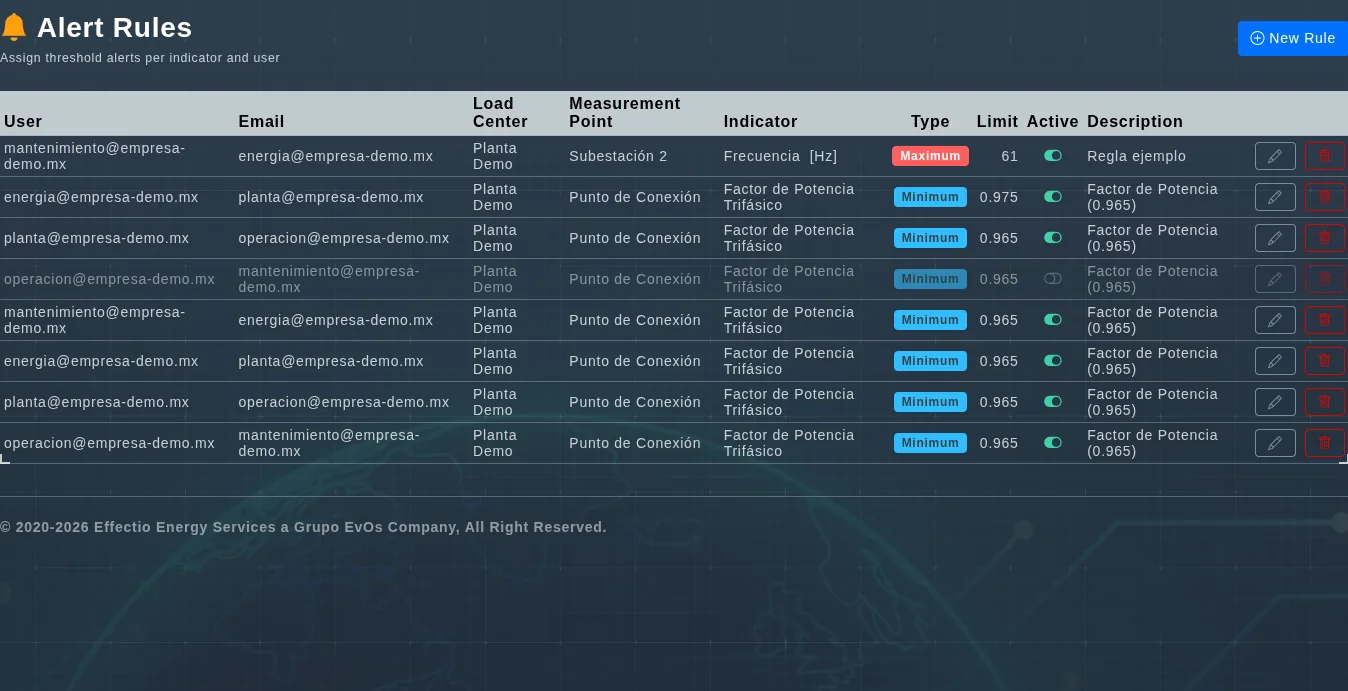
EVA-Smart AI alert rules by indicator, measurement point, type and limit
One rule per row: who it notifies, which point it watches, which indicator, whether the limit is a maximum or a minimum, and the value that triggers it. The greyed row is deactivated — still configured, but silent.

What each notification records

  • Date: when the limit was crossed.
  • Title and description: which condition was met.
  • Load center and measurement point: where it happened.
  • Export: the full list to CSV.

What changes in operations

  • The responsible area finds out the day it happens, not at month end.
  • Every deviation leaves a dated record, useful in an audit.
  • A critical point can be watched without assigning someone to it.
  • Rules are tuned as the plant's normal behaviour becomes known.

Define your own alert rules

Book an EVA-Smart AI demo and let's configure a rule on your critical point.

Request a demo